


Breaker Box: Panel Directory
4.346.00 Reviews
App Specs
- Version
- 2.6.0
- Updated On
- License
- Free
- Downloads
- 10,000+
- Developer
- Brett Pappas
- Categories
- House & Home
- Platform
- Android
Screenshots
 Analysis by AppCompare
My household’s breaker panel tends to become a shared mystery: one person writes a label, someone else changes a room’s use, and the next person is left guessing. Breaker Box - Panel Tool is meant to help keep that information in one organized place. I like the idea, especially for homes where more than one adult may need to identify a circuit, but I’d treat the app as a reference aid—not a substitute for safe electrical work or a clearly maintained panel.
A practical job for a shared household
The most useful time to build a panel map is when nothing is wrong. On a calm afternoon, I’d identify circuits methodically and record what each one appears to control, rather than trying to do the whole job during an outage. That turns a stressful search into a planned household task and gives everyone a better chance of finding the right information later.
A realistic example: a house sitter notices that a room has lost power while the rest of the home is fine. A current, readable map can help them locate the likely breaker without opening every cabinet or calling the owner for a string of guesses. It is still sensible to leave clear instructions about when to contact you or an electrician, rather than expecting a visitor to troubleshoot anything beyond a simple identification task.
What a digital map can—and cannot—settle
Breaker labels are only useful when they match the circuits today. Rooms get repurposed, appliances move, and older handwritten notes can be vague. I’d record labels that describe the actual area or equipment served, then revisit uncertain entries instead of presenting a guess as fact. If one breaker appears to affect several places, capturing that nuance is more helpful than forcing it into a tidy but misleading room name.
That is also where this kind of tool differs from a paper directory taped inside the panel door. Paper is quick to glance at and does not depend on a phone, but it can be hard to update neatly and may be overlooked by someone who does not know where it is. A digital record is easier to carry and share, while a physical label remains the better immediate reference at the panel. I’d use them as complements, not assume one replaces the other.
Who will get the most from it
I can see this app suiting homeowners who have an unlabeled or confusing panel, people who manage a rental, and anyone who wants a household reference before a disruption happens. It may be less useful if your panel is already clearly marked and rarely changes, or if you want an app to diagnose faults, monitor electricity use, or control circuits remotely. A map can tell you what a breaker is believed to serve; it cannot establish why a circuit has failed.
For a home with children or guests, I’d keep the map’s role simple: help an appropriate adult find information, not encourage anyone to handle electrical equipment. The app’s Everyone age rating makes it broadly available, but that is not a safety instruction. I would explain that identifying a label is different from opening equipment or attempting repairs, and leave electrical work to a qualified professional when the situation calls for one.
Worth Reading Before You Choose

Switching to Android Auto Means Rethinking Your Driving Routine

Google Calendar Makes a Crowded Week Easier to Manage

Baby Panda World Brings Quick Play to Modern Phones, but Its Game Library Feels Busy

ESPN’s Live Game View Makes Following Close Games Easier

QuizzLand Review: A Good Fit for Short Trivia Breaks, Not Every Player

Basketball Stars: Multiplayer Is Fast, but Can It Recover When Matches Go Wrong?
Making the record dependable
A useful map is a small coordination habit, not a one-time data dump. I’d update it after a renovation, a change in room use, or any work that affects a circuit, and I’d make sure another responsible adult knows where to find the record. If you share information with a visitor or tenant, share only what they need for the task and explain how to reach you if the label does not fit what they see.
Before relying on any digital record during an emergency, consider whether the person who needs it can access it on their own device and whether the information is current. A printed copy near the panel can serve as a fallback, provided it is kept legible and updated alongside the digital version. That small bit of redundancy is more dependable than assuming a phone, account, or saved copy will always be available at the right moment.
Getting Started with Breaker Box - Panel Tool
First things first, downloading the app was a breeze. It's available for both Android and iOS, so whether you're team Android or an Apple aficionado, you're covered. Once installed, I was greeted with a clean and intuitive interface that made me feel right at home. Seriously, no tech experience required here—just a willingness to finally organize that chaotic breaker box.
Mapping Your Breaker Panel
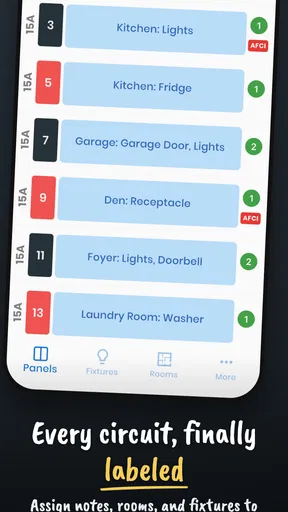
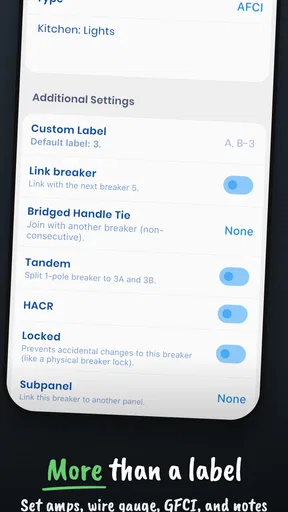
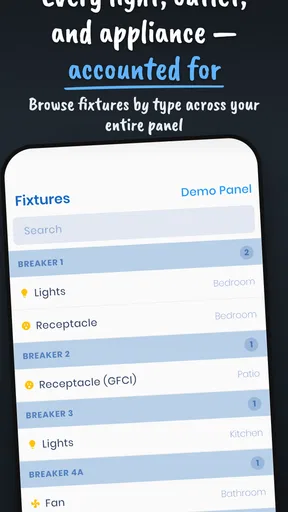
The main feature of Breaker Box - Panel Tool is its ability to map out your breaker panel. I spent a Saturday afternoon doing just that, and it was surprisingly satisfying. The app allows you to label each breaker with its corresponding circuit, so no more guessing games during a power outage.
Adding labels was straightforward. I simply tapped on a breaker, entered a name and description, and voilà! You can even add photos for a visual cue, which I found super helpful. Now, when I look at my panel, I see "Kitchen Lights" and "Living Room Outlets" instead of a bunch of anonymous switches. It’s like organizing a closet but for your electricity.
Features That Stand Out
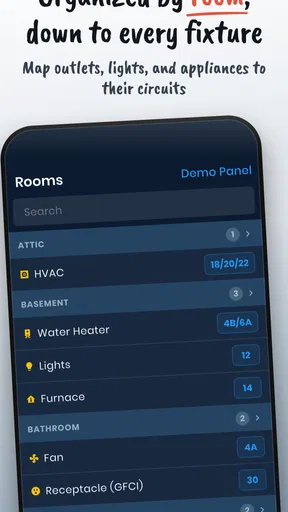
One of the standout features is the ability to share your panel map with others. Going on vacation? Share it with your house sitter. Renting out your place? Your tenants will thank you. The app also offers cloud backup, so your data is safe and sound, even if your phone takes an unexpected dive into the pool.
Another nifty tool is the ability to set reminders for routine maintenance. I'm the type who forgets to check smoke detectors, so having the app nudge me to inspect the breakers is a godsend. It's like having a tiny electrician in your pocket, keeping you on track.
Reading the cost and household trade-offs
This is a free House & Home app from Brett Pappas, with an average rating of 4.3 from 96 ratings, 43 written reviews and more than 10,000 installs. It is rated for Everyone, and the current release is version 2.3.0; the listed minimum operating-system requirement is 7.0. Those details make it easy to see why a homeowner might try it as a modest organizational project, but the rating alone cannot tell you whether its approach suits your particular panel or household routine.
There are in-app purchases priced at $8.99 per item, so I would check what is included before deciding to spend anything. The basic appeal is the panel record itself; whether a paid item adds enough value depends on how often you need the extra capability. For a simple home map, I’d first decide whether the free experience handles the job you actually have rather than assuming every household needs an upgrade.
There is also a small account-boundary question whenever household information is stored or shared. The app’s sharing and cloud-backup options can be convenient, but I would not treat them as a reason to pass around a single phone login or give every household member unrestricted access to the same device. Keep the phone’s normal privacy protections in place, share the panel information only with people who need it, and make sure the person responsible for maintaining the map can still retrieve it.
How I’d coordinate updates
For shared homes, I’d choose one person to maintain the labels and ask everyone else to report changes rather than making informal edits in several places. That avoids competing versions and reduces the chance that an old description remains in circulation. A quick review after electrical work or a room change is more useful than repeatedly checking a stable panel on an arbitrary schedule.
Photos can help when a label alone is ambiguous, but they are only helpful if they show the right context and remain current. I’d use them to clarify a location or a panel arrangement, not as proof that a circuit is safe to touch. If a photo or note could confuse a guest, I’d simplify the shared instructions and keep technical details for the responsible adult or professional.
Ease of Use and Accessibility
What really blew me away was how easy it was to use. I’m no tech guru, but the app’s design is so user-friendly that even my tech-averse partner found it enjoyable. The developers clearly put a lot of thought into making this app accessible to everyone, regardless of their tech skills.
The app supports voice commands as well, which is perfect for those moments when your hands are full or you're simply feeling lazy. Just tell it what you need, and it’s done. It’s these little touches that make the app feel polished and thoughtful.
When I’d choose another approach
If your main goal is to keep a permanent, glanceable record at the panel, a legible paper directory has a practical advantage: nobody needs to unlock a phone to read it. If the panel serves several separate units or a complex property, I would not rely on a casual household map as the sole documentation; a qualified electrician’s labeling and records are the better fit. And if you are looking for live energy readings, remote switching, or fault diagnosis, this is not the sort of panel tool I would choose for that job.
My advice is to use the app for organization, then check whether the resulting labels make sense to another adult who did not create them. If they cannot tell what a description means, revise it before sharing. That simple second-person check catches vague shorthand and makes the map more useful without pretending that a phone record can replace professional assessment.
Why You Should Consider It
If you’re like me and love a good organizational project, Breaker Box - Panel Tool is a must-have. It's not only about labeling; it's about peace of mind. Imagine never having to fumble around in the dark, trying to figure out which breaker to flip. That's a win in my book.
Plus, with energy costs on the rise, knowing exactly what's on each circuit can help you manage your consumption more wisely. Turn off unnecessary circuits when you're not home, and watch those savings add up.
In conclusion, Breaker Box - Panel Tool is more than just an app—it's an essential tool for anyone looking to bring order to their home’s electrical chaos. It’s simple, efficient, and makes you wonder how you ever lived without it. So, if you’re ready to take control of your breaker panel once and for all, give this app a try. Your future self will thank you.
Pros
- Intuitive user interface.
- Real-time electrical monitoring.
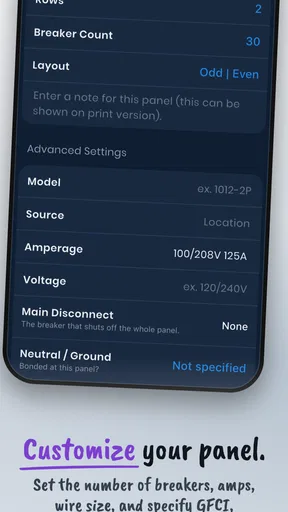
- Customizable panel settings.
- Offline access available.
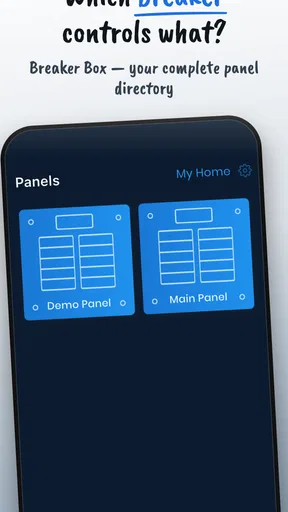
- Supports multiple panels.
Cons
- Limited free features.
- Occasional sync issues.
- No dark mode option.
- Requires account setup.
- Ads in free version.
FAQs for Breaker Box: Panel Directory
What is Breaker Box - Panel Tool used for?
Breaker Box - Panel Tool is an app designed to help users manage and organize their electrical panel information. The app allows users to label breakers, keep track of circuits, and maintain a digital record of their breaker panels. This can be particularly useful for electricians and homeowners who want to easily access and update their electrical system information.
Is Breaker Box - Panel Tool available for both Android and iOS?
Yes, Breaker Box - Panel Tool is available for download on both Android and iOS platforms. Users can find it on the Google Play Store for Android devices and the Apple App Store for iOS devices, ensuring accessibility across a wide range of smartphones and tablets.
Does Breaker Box - Panel Tool require an internet connection to function?
No, Breaker Box - Panel Tool does not require an internet connection for basic functionality. Users can access and update their breaker panel information offline. However, an internet connection may be needed for certain features like cloud backup and updates.
Can I share my breaker panel information with others using Breaker Box - Panel Tool?
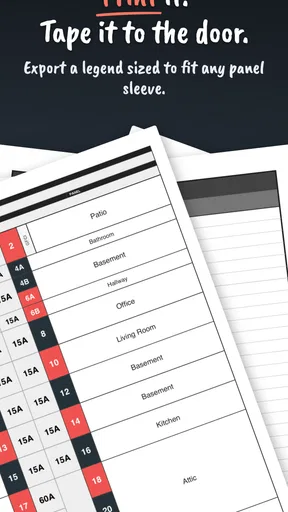
Yes, Breaker Box - Panel Tool allows users to share their panel information with others. This can be particularly useful for electricians who need to communicate details to clients or team members. The app provides options to export panel data and share it via email or other sharing platforms.
Is there a cost associated with using Breaker Box - Panel Tool?
Breaker Box - Panel Tool offers a free version with basic features suitable for most users. However, there is also a premium version available that provides additional features such as cloud backup, advanced labeling options, and more. Users can choose the version that best fits their needs.


